Sanic's LibreWorlds 101: WorldsMarks
Now that you have made some friends, it is time to start exploring worlds!
WorldsMarks are how you save a world or a location that you want to visit later.
>> Click on the "WorldsMark" button on the top-right menu.
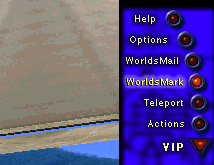
You will see a new menu that allows you to:
>> Mark (add) the world (and spot!) you are currently in.
>> Delete a WorldsMark you have.
>> Edit a WorldsMark (change link or name).
>> Teleport to a WorldsMark (the list of my Marks are in the red square, by clicking on the name of the mark, i teleport there).
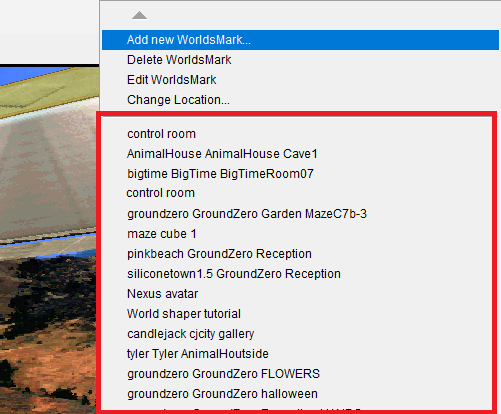
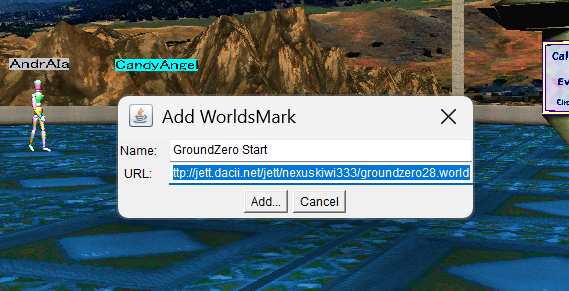
To start exploring interesting Worlds, click Add Mark, and paste the link below in the URL field:
http://jett.dacii.net/jett/nexuskiwi333/groundzero.world#Reception@6509.0,1753.0,150.0,25.0,0.0,0.0,-1.0
>> Name it "Travel world".
>> By clicking on WorldsMark button again, you will see your "Travel world" mark. If you click on it, you will teleport there!
>> If you want to save the world you are in, click Add WorldsMark, then click "Add" without changing the URL.
>> You can use the "Teleport" button in the menu to visit Built-in worlds (like GroundZero).
The travel world you now have contains many other worlds created by other users. You will see the names of the worlds on the walls, by clicking on a name, you teleport to the world. :)